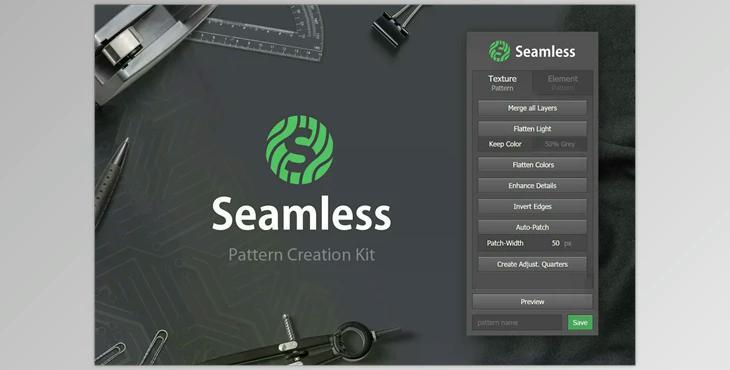
CM – Seamless – Pattern Creation Kit for Photoshop: Seamless is a Photoshop plugin that allows you to create seamless or tileable patterns or textures with only several clicks. What exactly does it mean? A seamless pattern can be repeated with no sharp edges. In order to achieve this, this software comes with a range of time-saving functions.
- Photoshop Extension or plugin
- Simple to use Panel/UI
- Aids in creating seamless Element and Texture based patterns
- View and save your patterns directly in the panel
- Installation Guide included
- Works in conjunction with Photoshop CC+
Description of the Function (Global)
- Previews: Quickly show/hide a preview of how the image could appear if it were a repeating pattern.
- Save The image you save to the preset pattern using the name you specify.
Functional Overview (Element patterns)
- Fix Overflow Look for layers that are overflowing and copy them onto their opposing side(s). Each copy is linked to its source layer. Take them all off with the click.
- Eliminate: Delete all the shifting layers created through the process described above.
- Shuffle Positions Affix a different position for each layer. Decide if they should remain within the document or the extent of overlaps is allowed.
- Shuffle Rotations Give a randomly rotated rotation for each layer. Select a min and maximum angle.
- Shuffle Scales Scale each element randomly according to a defined value range. (creates Smart Object to preserve the quality)
- Spread Horizontally/Vertically Equally disperse all layers equally in a vertical or horizontal direction. (calc. basing their central point)
Functional Overview (Texture patterns)
- Combine all layers A small time-saver to merge all layers into the background layer.
- flatten light: Eliminate light contrasts from the photo in order to make it easier to make seamless. (color & grey mode)
- Smoothen Colors: Reduce colors to the color of the average.
- Enhance the Details Highlight small aspects of an image to make them more clear.
- Reverse Edges Set an offset that reverses the edges and displays non-tileable areas.
- Auto Patch Instantly, content-aware fills in problem areas. Manual patching may be necessary.
- create Quarters The image is duplicated for each of its quarters onto an individual layer for local adjustments